Deschutes County DIAL, formally known as Deschutes Interactive Access Line, is the county’s free property information website. It gathers assessor, tax, permit, zoning and map records in one place for each property in the county, including those inside Bend, Redmond, La Pine and Sisters. It is a county record, not a title report.
This guide covers how to search DIAL, what its pages tell you, and how to confirm what you find in the County Clerk’s recorded documents. It is general information, not legal or title advice. DIAL tells you what the assessor has on file. A title report from a title company is how a sale confirms what is recorded. DIAL’s own Warnings page says independent verification is recommended and that “confirmation is commonly provided by title companies,” among others. We looked at these screens in October 2026, and screens and fees change.
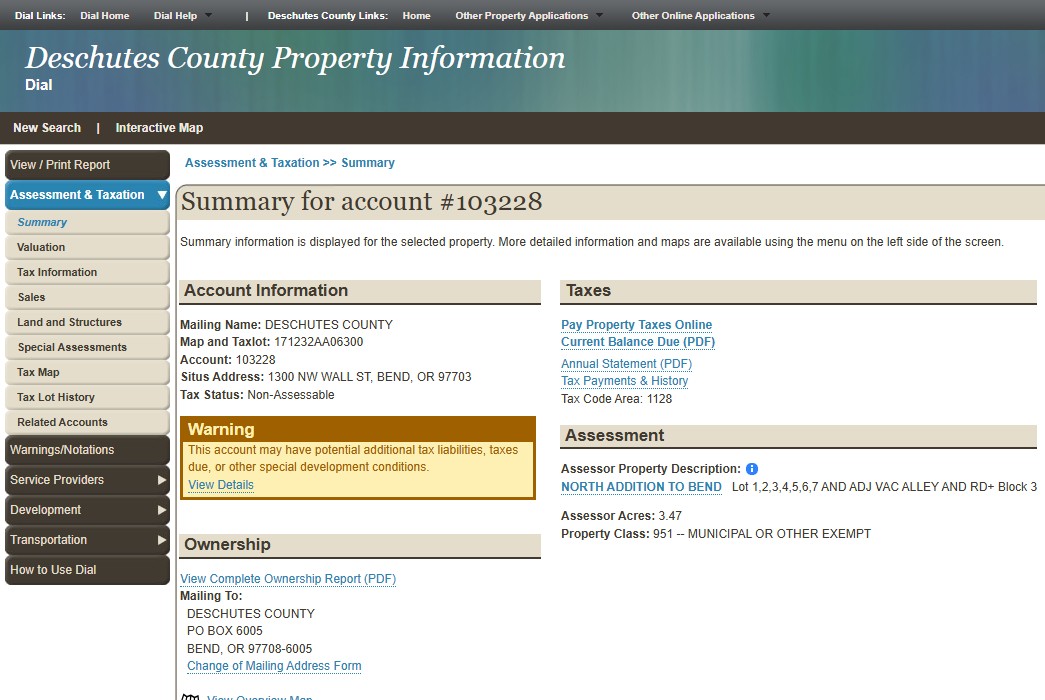
Our example is the county’s own property at 1300 NW Wall St in Bend, account 103228.
How do you search Deschutes County DIAL?
The DIAL home page lets you search by General, Owner Name, Account #, Map / Taxlot, Property Address (Situs), Subdivision or Mobile Home Park, and it has an Interactive Map. If only one property matches, DIAL opens its page automatically. Typing account 103228 went straight to the Summary page.
Our own shortcut is the DIAL Interactive Map. We go straight to it, search the address and zoom to the lot. The map section below covers what we check there.
DIAL’s help advice is “Less is More.” The DIAL home page says two or three word search terms usually give the broadest results. In our experience, an address search that fails usually works with just the street number and street name, without Rd or Ct. If not, search the owner name.
The map and tax lot number is worth learning. The county’s Tax Maps page breaks a tax map number into township, range, section, quarter and sixteenth. For our example, 171232AA06300 is tax map 171232AA (township 17, range 12, section 32, quarter A, sixteenth A) plus tax lot 06300. Copy it exactly.
What does the DIAL Summary page tell you?
The Summary page tells you who the assessor mails to, the map and tax lot, the account number, the address, tax status, acres and values, plus three flags worth reading. It sits under Assessment & Taxation. On the example account, it shows the mailing name, map and tax lot, account number, situs address and tax status. It also shows the owner’s mailing address, tax code area, acres, property class, and land and structure values.
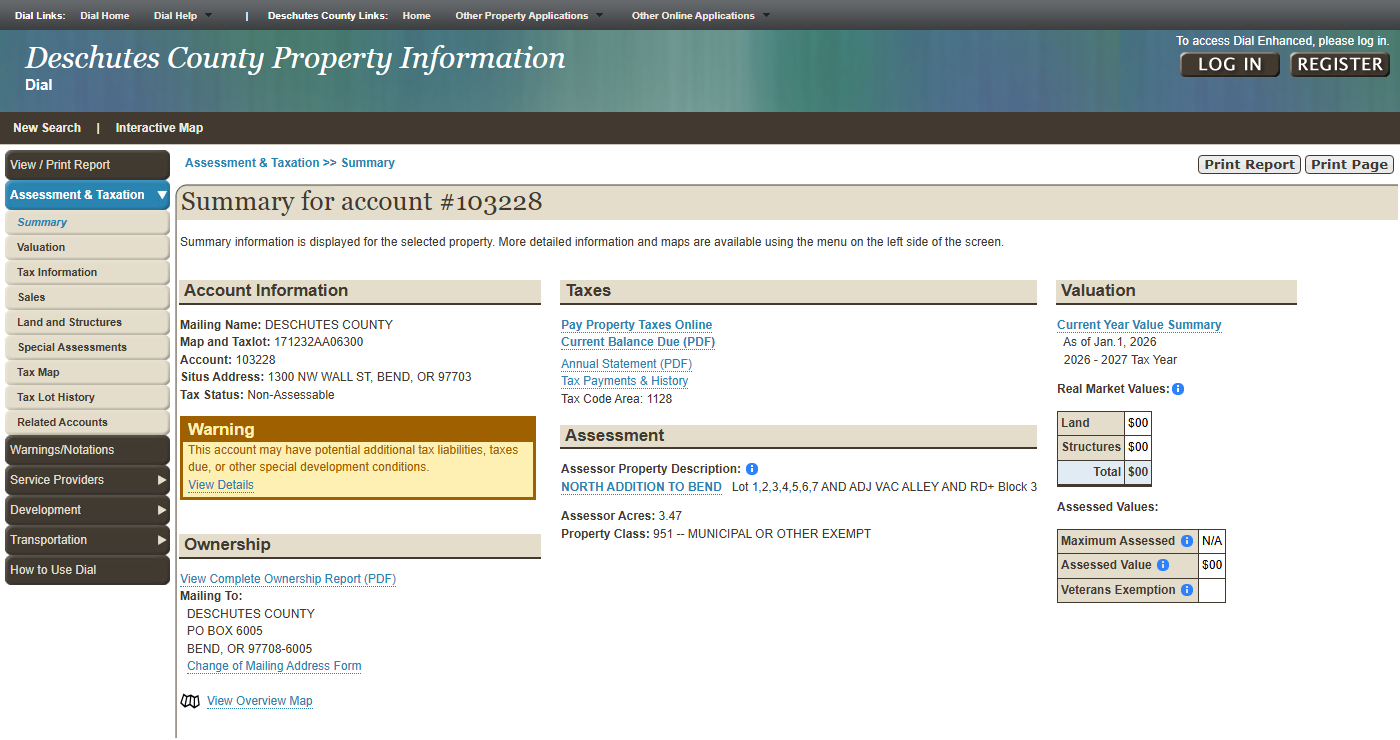
Two of those fields are easy to misread.
The “Mailing Name” is what the assessor mails to. We read it as a lead on who owns the property, not as the owner. The “Assessor Property Description” (subdivision, lot, block) is not a legal description. DIAL’s terminology page says this description may not be acceptable to use when drafting a legal document, and to verify it with a licensed Oregon attorney or surveyor.
Look for three flags on the Summary page.
A Warning box on the example Summary page says the account may have potential additional tax liabilities, taxes due, or other special development conditions. It links to the Warnings/Notations page. On our example the only notation was that Deschutes County owns the property. On yours the box may say something else, so read what it says.
A line reading “This account has N related accounts” means other accounts are tied to the same tax lot. DIAL’s terminology page says that can be a split across tax code areas, business personal property, or a manufactured home not owned with the land.
A “MULTIPLE SITUS ADDRESSES” link opens a PDF listing each address, as it does on this Redmond account. Confirm the address you were given is on the list.
The “Print” button and the “View Complete Ownership Report (PDF)” link give you a record to keep. The ownership report is an Assessor names list, not a title report.
What else is in the DIAL menu?
The rest of the menu covers taxes, sales, permits, zoning and service districts, each on its own page. DIAL has a left-hand menu of pages, not tabs. Under Assessment & Taxation you will find Valuation, Tax Information, Sales, Land and Structures, Special Assessments, Tax Map, Tax Lot History, Related Accounts and Warnings/Notations. We open Special Assessments, Tax Lot History, Related Accounts and Warnings/Notations on every property we research.
Under Development, the Development Summary names the planning jurisdiction and Urban Growth Boundary, and lists the zoning designation with a link to the zoning code. The Zoning Map page sits beside it, and Service Providers has a City Map. We check county versus city first, because it tells you whose rules apply.
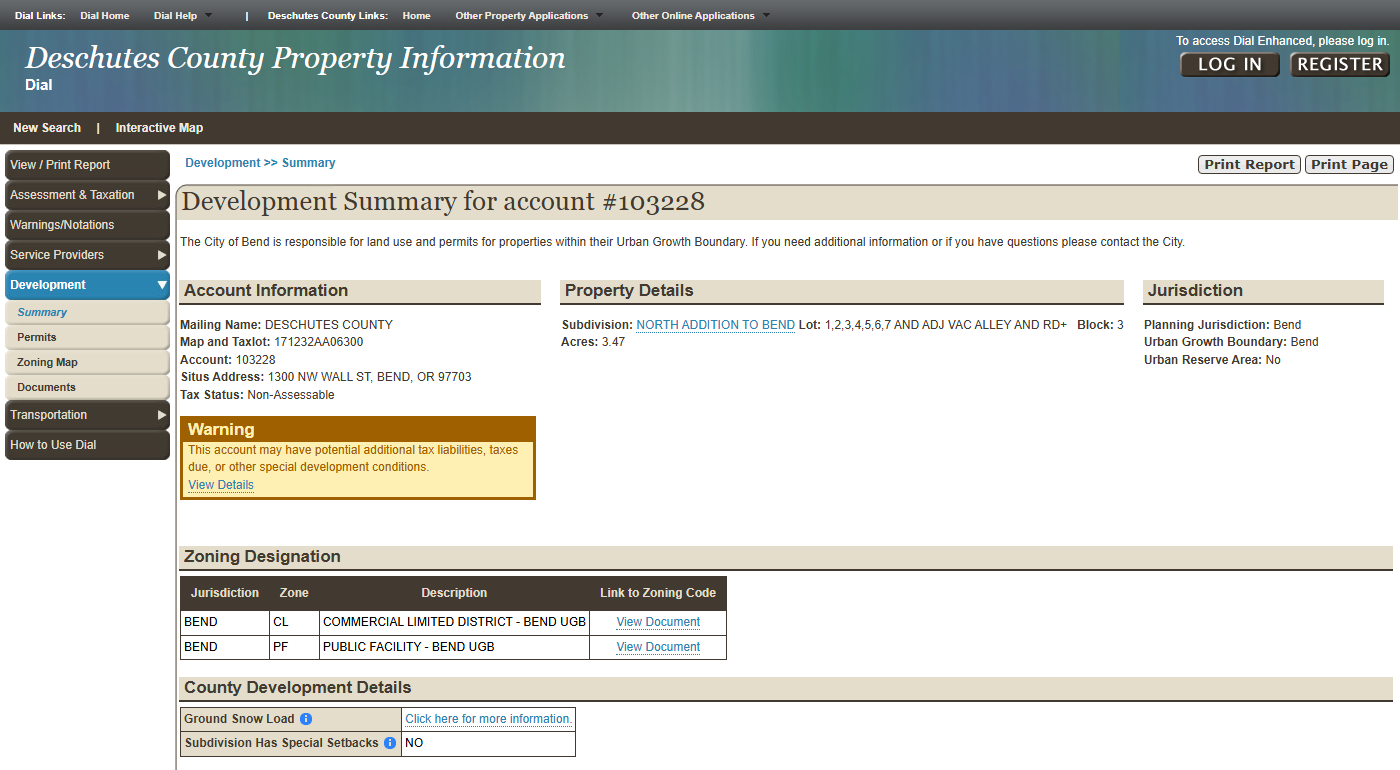
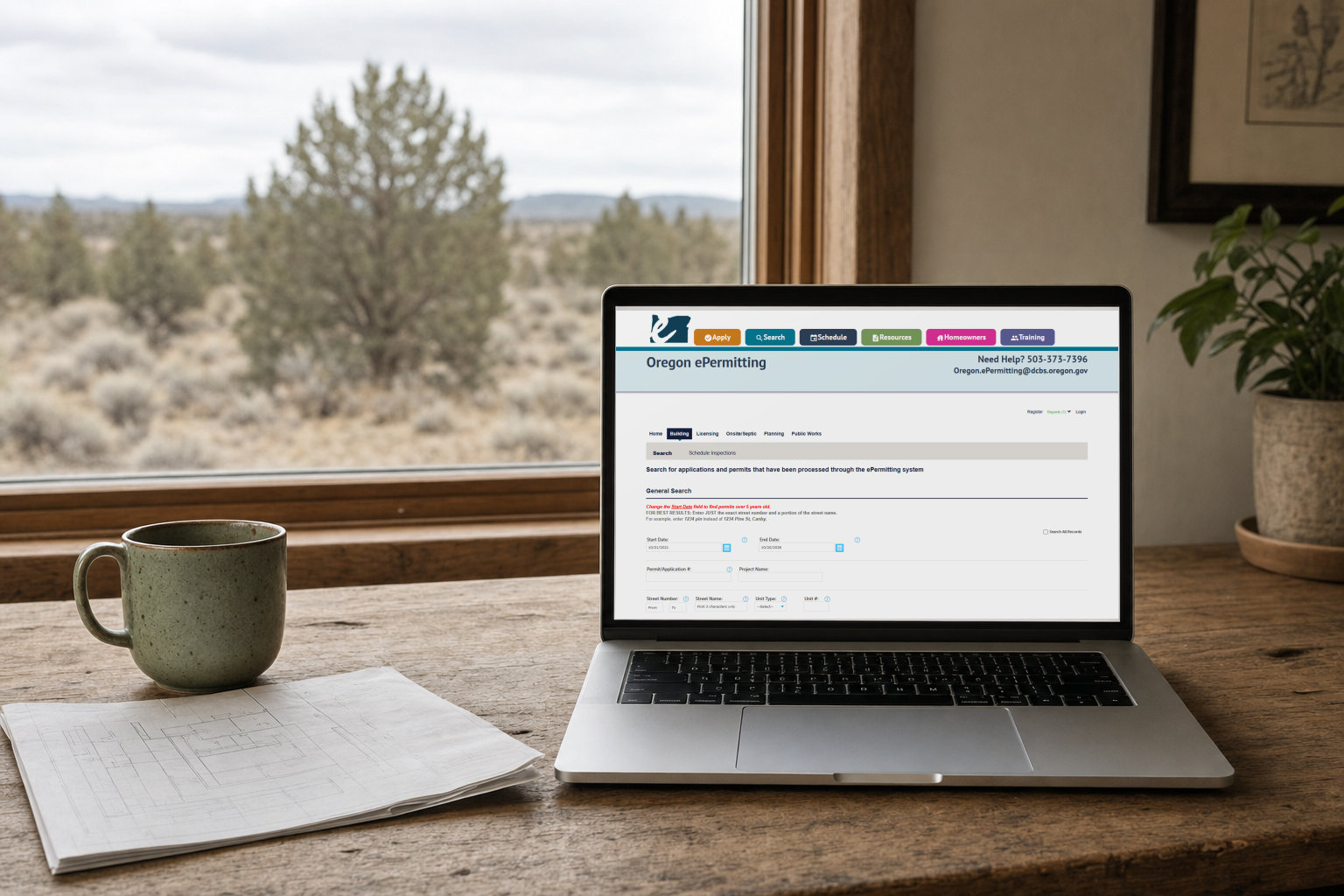
The Permits page is where permit history lives. The county’s How to Use DIAL page says the Permit tab shows permit history, inspection history, work descriptions and inspector notes. For Bend-area properties, the Permits page notes that the City of Bend is responsible for land use and permits inside its Urban Growth Boundary. Our Oregon ePermitting guide shows how to search the state system where Deschutes County building and septic permits are filed.
The Sales page lists sale date, seller, buyer, amount and recording instrument. DIAL’s terminology page defines the sale date as the date a document was signed, not the date it was recorded. That recording instrument number is the bridge to the Clerk’s records. DIAL also links to the Clerk’s Digital Research Room from here.
In our experience, the Service Providers section shows the fire district and any water or sewer district. Keep the fire district’s name, because buyers often need to reach the fire marshal. No water or sewer district on a county lot points toward a well and septic, but that is not proof.
How do you use the DIAL Interactive Map?
We open the Interactive Map first to find the lot, then come back to it after the account pages to check the overlays one at a time. The Help page says it lets you select multiple layers. Layer names can change, so we describe the layers by what they show.
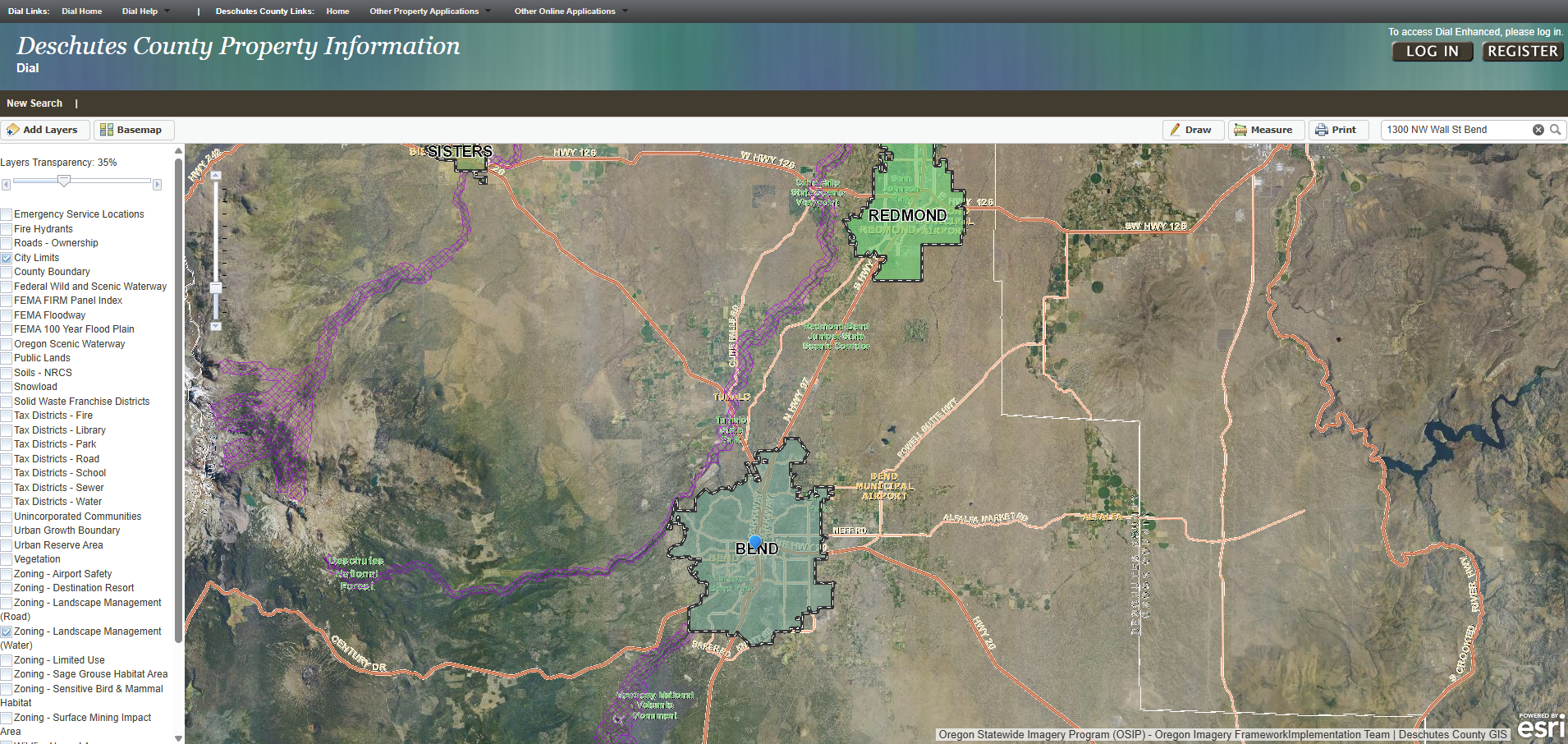
Here is our practice. Everything below is what the map shows, not a verdict on the lot.
Turn on city limits first on the map. It tells you whether the county or a city sets the rules for the lot.
Then work through the overlay layers one at a time. Look for whichever of these the map offers: flood, wildfire hazard, airport safety zones, wetlands, wildlife and habitat areas, scenic waterways, surface mining, the urban growth boundary, and water and sewer districts. We have seen a lot sitting under an airport flight path.
Save or print a map for every layer you check. A “no” is almost as useful to a buyer as a “yes”, because it shows what was checked.
Check the overlay on the map itself. In one of our files, the wildfire hazard overlay showed on the map even though the account pages had not flagged it.
Look at the zoning around the lot, not only on it. In our experience, a neighboring farm or forest zone can bring added setbacks or firebreak requirements. Confirm with the county planning division.
The map is not a buildability verdict, and it does not replace the county’s confirmation.
How do you confirm it in the County Clerk’s recorded documents?
Use the Clerk’s Digital Research Room to open the vesting deed by its instrument number, then search owner names for trust deeds and other recorded documents, and read them. The Clerk’s Digital Research Room opens on a disclaimer page with a CAPTCHA and an “I Agree” button. In our experience you need no account to search it. The index is not searchable by street address: the Clerk says its office does not index situs addresses and tells you to search by name.
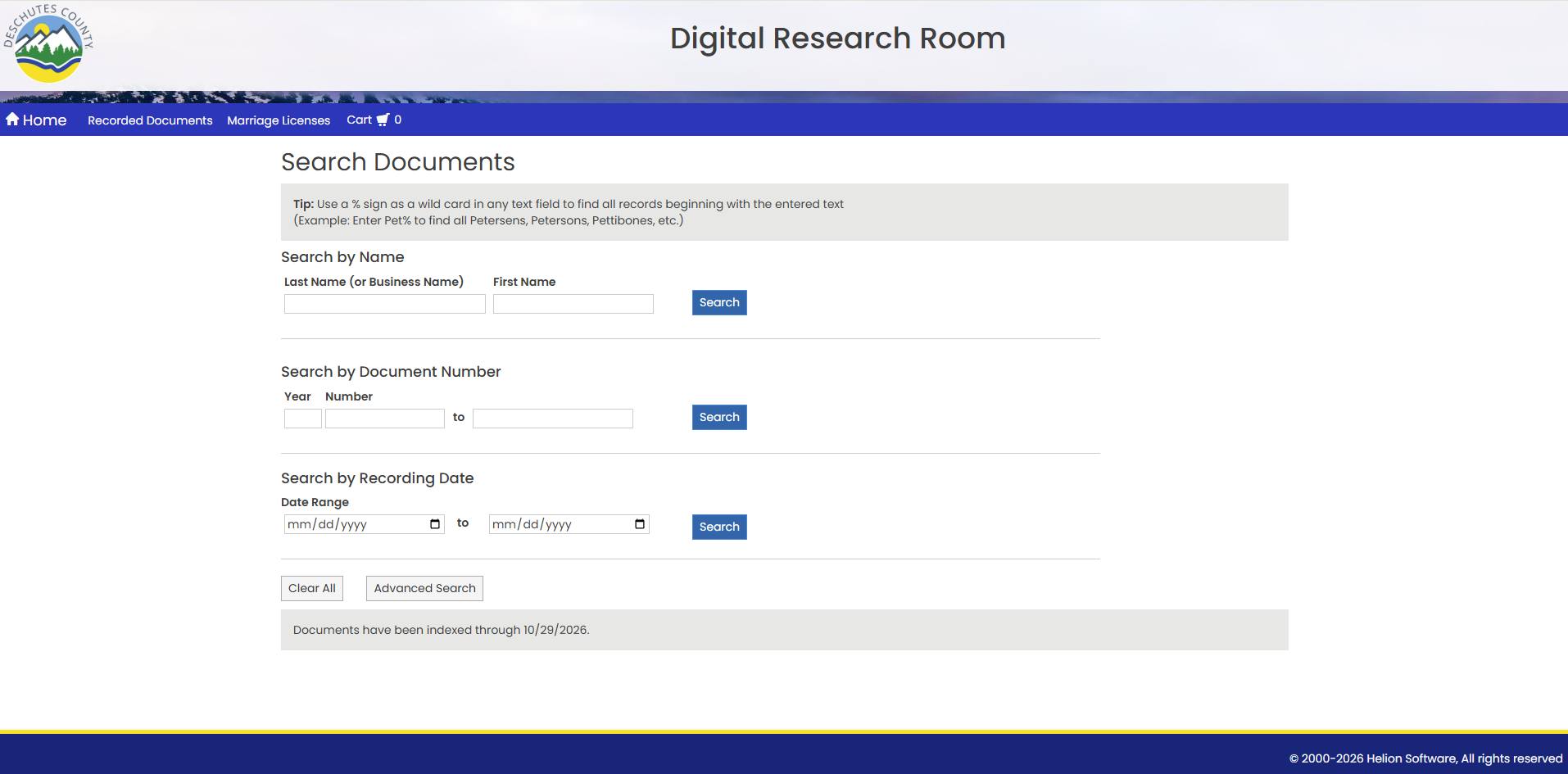
As of October 2026, the Search Documents page offers three basic searches: by name (last name or business name, then first name), by document number (year and number in separate boxes), and by recording date range. There is also an Advanced Search button. A Book & Page search is available under Advanced Search, which the county’s Recording page says reaches deed records back to 1871.
The page also carries a tip: a % sign works as a wild card in any text field to find records beginning with the entered text. The county’s example is Pet%, which finds Petersens, Petersons and Pettibones. Our habit is to enter the last name only and add %. It helps most with business names whose endings vary: Acme% would catch an invented Acme Land LLC and Acme Land Company alike.
The page states how current the index is (“Documents have been indexed through” a date). Anything recorded after that date won’t show yet, so check the date before concluding a document doesn’t exist. A document’s details page lists the parties and, as we see it, the other documents that refer to it.
Here is the order we follow. Use DIAL to confirm the right parcel: map and tax lot, situs list, Assessor Property Description and mailing name. On the Sales page, note the most recent transfer to the current owner and its instrument number. In the Clerk’s records, open that deed (the vesting deed, the one that put the current owner into title) and read it to see who took title and how. Then search the owner names from that date forward for trust deeds, liens, easements and other recorded items. Open each document’s image and check that the legal description matches this parcel, since one owner can have several properties.
You can view and download a copy of a document from the Digital Research Room, but its disclaimer says images have not been certified. The county sells certified copies, and fees are listed on each document page and the Ordering Copies page.
One bridge from DIAL to the Clerk’s site: the subdivision name on our example, North Addition to Bend, links to its recorded plat. The plat itself is dated 1910.
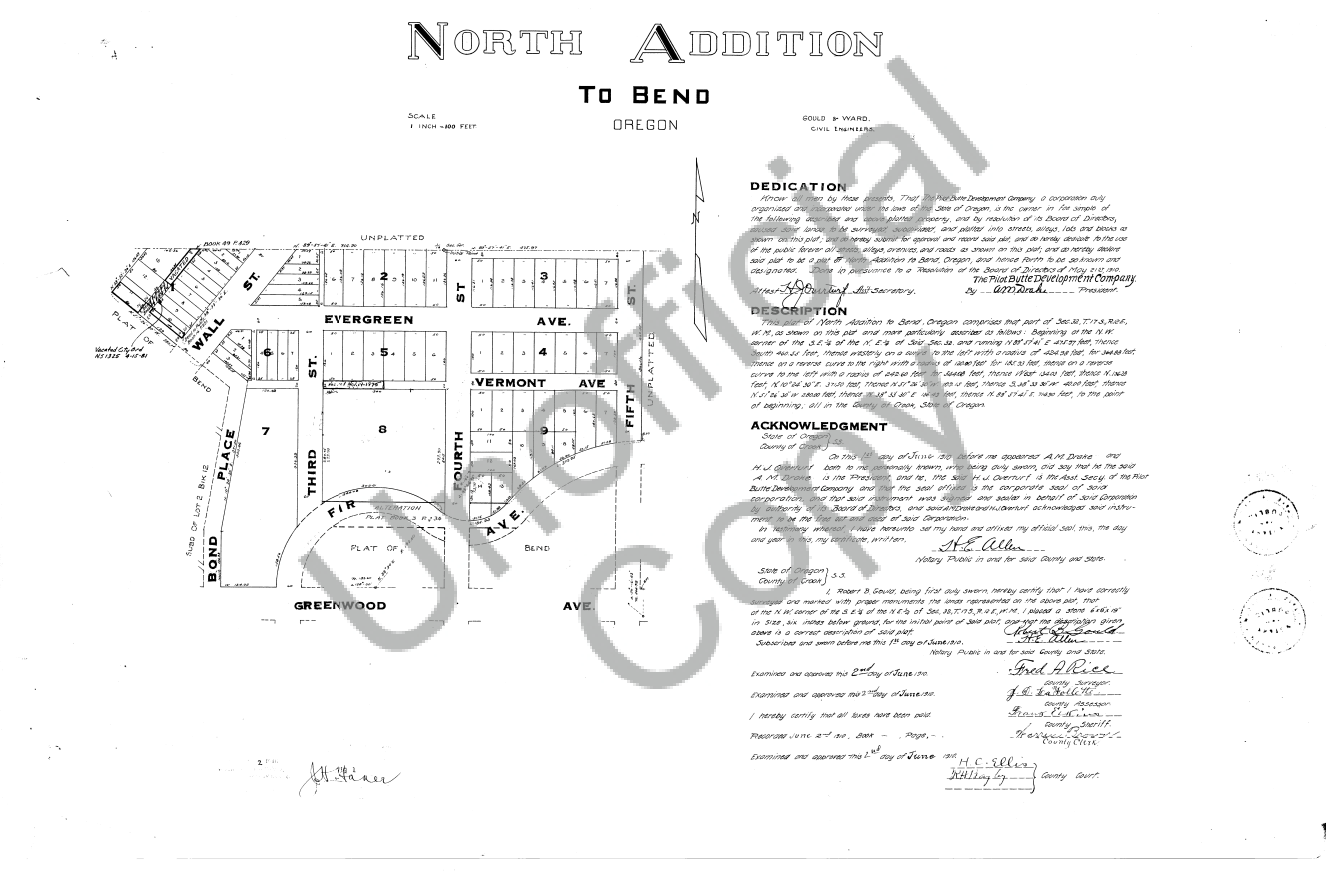
In our experience, most subdivision lots have a recorded plat. When DIAL links one, save it. Dashed lines along lot edges on a plat often mark easements, but conventions vary, so read the plat’s legend for what the lines mean, and use the Clerk’s records or a title report to confirm what is recorded. Notes on the plat can point to CC&Rs.
Run the free checks from home
The SiteFacts Land Buyer's Field Guide has a one-page checklist and 15 free checks to run from home, plus a decoder for 12 listing phrases.
What traps catch people in Deschutes County property records?
Six traps come up in these records: paid-off loans that don’t always show under the borrower’s name, trusts that hide the people, deeds that differ from DIAL’s summary, name variations, $0 sales and instrument numbers that look different in different places.
Paid-off loans do not always show up under the borrower’s name
After a trust deed loan is paid off, ORS 86.720 says the lender must ask the trustee to reconvey (to release the lender’s claim, by a recorded document called a reconveyance) within 30 days of payoff, and the trustee must reconvey within 30 days of that request. If no reconveyance is executed and recorded within 60 days of payoff, a title insurance company or insurance producer may record a release of trust deed after a 30-day notice, and the statute treats that release as the equivalent of a reconveyance. In our experience, the reconveyance is often indexed under the lender or trustee, not the borrower. So open the trust deed’s details page and look for a referencing document. The county’s recording FAQ also says to confirm with the lender that an obligation is satisfied.
Trusts hide the people
If DIAL shows an owner like “SMITH FAMILY TRUST,” the Sales page buyer column may show the trustee’s name followed by “ET AL.” In our experience, search those individual names too, because loans are sometimes recorded under the people, occasionally before the property went into the trust. Read the deed.
DIAL summarizes, the deed decides
A sales entry can list both spouses as sellers. Read the deed to see who signed, and ask a title company if a co-owner’s signature seems to be missing.
The same person can have several names
Maiden, hyphenated and married names can each be indexed separately. Search every version.
A $0 sale is usually not a sale
In our experience, a $0 amount is typically a transfer into a trust, an LLC or a family member. The last arm’s-length sale may be further down the list.
Instrument numbers look different in different places
DIAL’s terminology page explains that the Clerk’s office historically used a Fee/Instrument Number plus a Book & Page number, and now uses a four-digit year and sequential number. DIAL shows 2018-18702. In our experience, the Clerk’s side may need leading zeros added.
What can these tools not tell you?
They cannot tell you whether title is clear. The Clerk’s office says in its recording FAQ that “it will be up to you to determine whether a lien is valid,” and that its recording office cannot interpret documents or give legal help.
They also only show what was recorded. Unrecorded interests, such as a handshake agreement, will not appear. And a recorded assignment may not show who holds the loan now. MERS’s FAQ says no new assignment is recorded when ownership of a loan transfers between MERS members. Separately, in Brandrup v. ReconTrust Co., 353 Or 668 (2013), the Oregon Supreme Court held, under Oregon’s nonjudicial foreclosure statute, that recording is not required for assignments that pass by operation of law with the note. That is background, not legal advice.
Boundaries and easements are a separate question. A plat or a survey may show easements. Easements recorded by separate document show up in the Clerk’s records or in a title report, and that is the check. For site planning, our practice is survey first, then plat, then tax map. The County Surveyor’s Survey Research page may hold a newer survey. Our property pins post covers the next step.
DIAL gives no verdict on whether the property can be built on. DIAL’s disclaimer says Deschutes County makes no warranty as to the accuracy or completeness of the data and assumes no liability for decisions made using it.
If you are vetting a customer’s lot for a builder, DIAL gets you the planning jurisdiction, the zoning designation and the permit history. Whether the lot can support the home is a different question.
The records can't tell you if the lot can support the home.
Who owns a property and what is recorded against it is one question. Whether the lot can support the home is another, and the records above don't answer it. A real person responds within 24 business hours.
If you are buying or building in Deschutes, Crook or Jefferson County, our Due Diligence page covers SiteFacts Reports, which look at zoning, access and other site questions the records above do not answer. Our permitting service covers filing the application once you are ready. Inside the City of Bend, we file building permits, and we ask for a site plan from a local engineering firm for those packages. SiteFacts is a product of Sand & Sage Solutions LLC.
Quick checklist
- Right parcel: map and tax lot, situs list, Assessor Property Description, mailing name
- Current owner and the instrument number of the most recent transfer, from the Sales page
- Vesting deed opened and read
- If a trust is involved: trustee names from the deed and the Sales page
- Every owner name and variation searched from the transfer date forward
- Index date on the Clerk’s search page checked
- Overlays checked on the Interactive Map, with a saved map of each
- Every trust deed checked for a reconveyance or release
- Legal description on each document matches this parcel
- Warning box, Related Accounts, Special Assessments and tax status reviewed
- Anything uncertain flagged for a title report
Quick answers
Is Deschutes County DIAL free?
Yes. The county’s How to Use DIAL page says it is free and accessible to anyone. DIAL also has a login-only enhanced edition, but the public edition needs no account.
This guide is general information from Sand & Sage Solutions, not legal or title advice. For a question about who holds title or whether a lien is valid, ask a title company or an attorney licensed in Oregon.